# Build a custom checkout
Build your own custom checkout experience using [MONEI Components](https://docs.monei.com/monei-js/overview/.md) to securely collect payment details for various methods directly on your site.
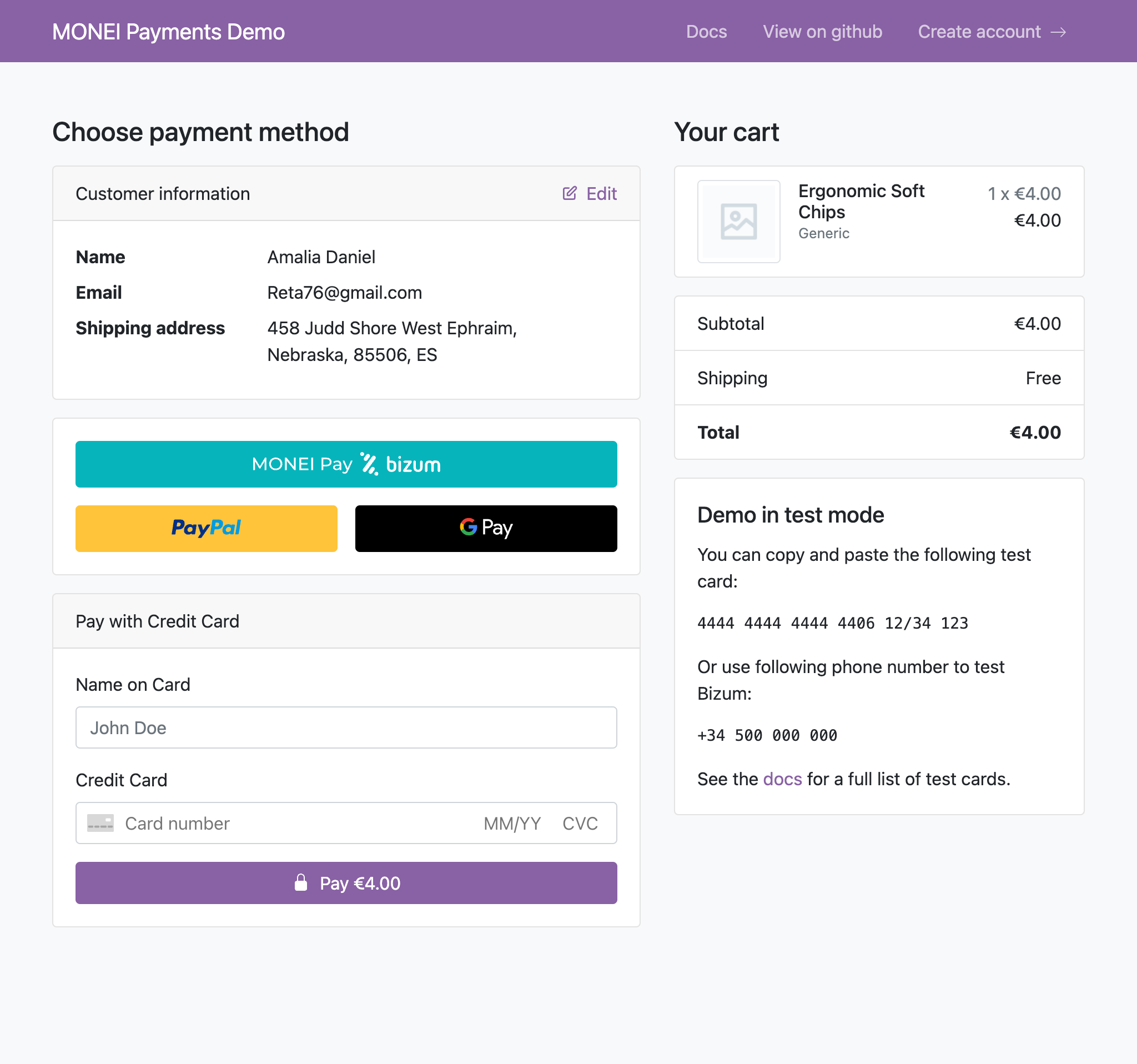
[](https://payments-demo.monei.com)
[Live demo](https://payments-demo.monei.com)
[Source code](https://github.com/MONEI/monei-payments-demo)
**MONEI Components Key Features:**
* Securely collect payment details via iframes hosted by MONEI.
* Generate a one-time `paymentToken` for secure server-side processing.
* Available for plain JavaScript, React, Vue, Angular, and Svelte.
* Support styling, language customization, and multiple payment methods.
* Helps meet PCI DSS compliance requirements as sensitive data doesn't touch your server.
## Before You Begin[](#before-you-begin "Direct link to Before You Begin")
* This guide covers integrating various payment method Components. If you prefer a simpler, no-code solution, consider the [Prebuilt Payment Page](https://docs.monei.com/integrations/use-prebuilt-payment-page/.md).
* You'll need a MONEI account and your API keys (test or live). Find them in your [MONEI Dashboard](https://dashboard.monei.com/settings/api).
* Use your [test mode keys](https://docs.monei.com/testing/.md) for integration testing.
* Ensure relevant payment methods are enabled in your account settings.
* You can monitor test payments in your [MONEI Dashboard → Payments](https://dashboard.monei.com/payments) (ensure Test Mode is active).
## How It Works[](#how-it-works "Direct link to How It Works")
1. Your **backend** creates a payment via the MONEI API and receives a `payment.id`
2. The **payment.id** is passed to your client-side checkout page
3. The customer enters payment details in a MONEI Component (secure iframe)
4. `monei.confirmPayment()` sends the tokenized details to MONEI, which handles 3D Secure if needed
5. MONEI sends the final payment status to your **backend** via webhook
## Integration Steps[](#integration-steps "Direct link to Integration Steps")
### 1. Create Payment (Server-side)[](#1-create-payment-server-side "Direct link to 1. Create Payment (Server-side)")
Create a [Payment](https://docs.monei.com/apis/rest/schemas/payment/.md) on your server with an amount and currency. Always decide the amount on the server side.
* cURL
* Node.js
* PHP
* Python
POST https\://api.monei.com/v1/payments
```
curl --request POST 'https://api.monei.com/v1/payments' \
--header 'Authorization: YOUR_API_KEY' \
--header 'Content-Type: application/json' \
--data-raw '{
"amount": 110,
"currency": "EUR",
"orderId": "14379133960355",
"description": "Test Shop - #14379133960355",
"customer": {
"email": "email@example.com"
},
"callbackUrl": "https://example.com/checkout/callback"
}'
```
(Replace `YOUR_API_KEY` with your actual MONEI API key)
server.js
```
import {Monei} from '@monei-js/node-sdk';
// Replace YOUR_API_KEY with your actual MONEI API key
const monei = new Monei('YOUR_API_KEY');
const payment = await monei.payments.create({
amount: 110,
currency: 'EUR',
orderId: '14379133960355',
description: 'Test Shop - #14379133960355',
customer: {
email: 'email@example.com'
},
callbackUrl: 'https://example.com/checkout/callback'
});
// Pass payment.id to your client-side
const paymentId = payment.id;
```
server.php
```
payments->create(
new CreatePaymentRequest([
'amount' => 110,
'currency' => 'EUR',
'order_id' => '14379133960355',
'description' => 'Test Shop - #14379133960355',
'customer' => new PaymentCustomer([
'email' => 'email@example.com'
]),
'callback_url' => 'https://example.com/checkout/callback'
])
);
// Pass payment ID to your client-side
$paymentId = $payment->getId();
?>
```
server.py
```
import Monei
from Monei import CreatePaymentRequest, PaymentCustomer
# Replace YOUR_API_KEY with your actual MONEI API key
monei = Monei.MoneiClient(api_key="YOUR_API_KEY")
payment = monei.payments.create(
CreatePaymentRequest(
amount=110,
currency="EUR",
order_id="14379133960355",
description="Test Shop - #14379133960355",
customer=PaymentCustomer(
email="email@example.com"
),
callback_url="https://example.com/checkout/callback"
)
)
# Pass payment ID to your client-side
payment_id = payment.id
```
**Key Parameters:**
* **amount** `positive integer`: Amount in the smallest currency unit.
* **currency** `string`: Three-letter ISO currency code.
* **orderId** `string`: Your unique order identifier.
* **callbackUrl** `string`: Your server endpoint for webhook notifications.
Check all available [request parameters](https://docs.monei.com/apis/rest/payments-create/.md).
The response contains `payment.id`. Pass this securely to your client-side for the next step.
### 2. Add Component to your payment page (Client-side)[](#2-add-component-to-your-payment-page-client-side "Direct link to 2. Add Component to your payment page (Client-side)")
Include `monei.js` on your checkout page by adding the script tag to the `head` of your HTML file.
checkout.html
```
Checkout
```
Create an empty DOM node (container) with a unique ID in your checkout page. Then, initialize the Component:
client.js
```
// Get paymentId passed securely from your server
const paymentId = '{{payment_id}}'; // Replace with actual paymentId
// Create an instance of the Card Input Component using the paymentId.
const cardElement = monei.CardInput({
paymentId: paymentId
// You can add other options like style, onFocus, onChange here
// See MONEI Components reference for details
});
// Render the Component into the container
cardElement.render('#card-element');
// Next step: Confirm the payment (see below)
```
Alternative: initialize with Account ID
You can also initialize CardInput with `accountId` + `sessionId` instead of `paymentId` to generate a token **before** creating the payment. This is useful for [express checkout with shipping](https://docs.monei.com/integrations/express-checkout/.md) or [subscription activation](https://docs.monei.com/subscriptions/build-custom-checkout/.md).
```
const cardElement = monei.CardInput({
accountId: 'YOUR_ACCOUNT_ID',
sessionId: 'unique_session_id'
});
```
When using this approach, pass the same `sessionId` when creating the payment server-side. See the [MONEI Components reference](https://docs.monei.com/monei-js/reference/.md) for details.
### 3. Confirm the payment (Client-side)[](#3-confirm-the-payment-client-side "Direct link to 3. Confirm the payment (Client-side)")
To complete the payment, you need to confirm it using the `monei.confirmPayment` function.
You need to provide the `paymentId` (obtained in Step 1) and a `paymentToken` generated with the Component.
client.js
```
// Assumes cardElement is the initialized CardInput component from Step 2
// Function to submit the card input and confirm the payment
async function handlePayment() {
try {
// Generate a payment token from the card input
const {token, error} = await cardElement.submit();
if (error) {
// Inform the user if there was an error.
console.error('Submit error:', error);
return;
}
// Confirm the payment with the generated token
const result = await monei.confirmPayment({
paymentId: paymentId,
paymentToken: token
});
// At this moment you can show a customer the payment result (e.g., redirect)
// But you should ALWAYS rely on the result passed to the callback endpoint
// on your server (Step 4) to update the final order status.
console.log('Payment status (client-side):', result.status);
// Example: window.location.href = '/thank-you?paymentId=' + paymentId;
} catch (error) {
console.error(error);
}
}
// You would typically call handlePayment() when the user clicks your pay button.
// Example: document.getElementById('your-pay-button').addEventListener('click', handlePayment);
```
After you confirm the payment, MONEI handles any necessary steps like 3D Secure authentication.
Alternative Flow
As an alternative process, you can submit the generated `paymentToken` to your server and then [confirm the payment server-side](https://docs.monei.com/apis/rest/payments-confirm/.md).
### 4. Process Webhook Notification (Server-side)[](#4-process-webhook-notification-server-side "Direct link to 4. Process Webhook Notification (Server-side)")
After the client-side interaction and any necessary background processing (like 3D Secure or bank authorization), MONEI sends the final, authoritative payment status via an asynchronous HTTP POST request to the `callbackUrl` you provided in Step 1.
The request body contains the full [Payment object](https://docs.monei.com/apis/rest/schemas/payment/.md) in JSON format.
This webhook is the **only reliable way** to confirm the definitive payment outcome.
**Crucially, you must:**
1. **Verify the `MONEI-Signature` header** included in the request. This confirms the webhook genuinely came from MONEI. See the [Verify Signatures guide](https://docs.monei.com/guides/verify-signature/.md) for implementation details.
2. **Return a `200 OK` HTTP status code** immediately upon receiving the webhook to acknowledge receipt. Any other status code tells MONEI the notification failed.
If MONEI doesn't receive a `200 OK`, it will retry sending the webhook.
Once the signature is verified, inspect the `status` field in the Payment object (`SUCCEEDED`, `FAILED`, `CANCELED`, etc.) to determine whether to fulfill the order or handle the failure.
## Before you go live[](#before-you-go-live "Direct link to Before you go live")
* Make sure you are using [live (production) mode](https://docs.monei.com/testing/.md) Account ID and API Key.
* Make sure you have a [payment method configured and enabled](https://dashboard.monei.com/settings/payment-methods) in live mode.